<?xml version="1.0" encoding="utf-8"?>
<feed xmlns="http://www.w3.org/2005/Atom">
    <id>https://blog.marcus233.top</id>
    <title>Marcus的小站</title>
    <updated>2026-03-05T10:27:41.237Z</updated>
    <generator>Nextjs/14.2.5</generator>
    <author>
        <name>Marcus</name>
        <email>marcus-zh@qq.com</email>
        <uri>https://blog.marcus233.top</uri>
    </author>
    <link rel="alternate" href="https://blog.marcus233.top"/>
    <link rel="self" href="https://blog.marcus233.top/atom.xml"/>
    <subtitle>feedId:72882646932738048+userId:72617922693905408</subtitle>
    <logo>/avatar.png</logo>
    <icon>/avatar.png</icon>
    <rights>CC BY-NC-SA 4.0</rights>
    <entry>
        <title type="html"><![CDATA[学习通抢课脚本]]></title>
        <id>xuexitong</id>
        <link href="https://blog.marcus233.top/posts/xuexitong"/>
        <updated>2025-02-23T12:03:00.000Z</updated>
        <summary type="html"><![CDATA[最近要抢课

一看学校发来的网址[`sdzx.chaoxing.com`](xxzx.chaoxing.com)

哟,这不是小学折磨我的学习通吗

熟练点了`F12`,进了开发者工具,一眼Vue

点抢课按钮,发现没有网络请求,但是有弹窗

调试了下,绷不住了,全是注释

```js
joinCourse: function(courseObj){
  var that = this;
  if(that.opType == 2){
    that.userEnroll();
    if(!that.checkAgainNum()){
      app.showMsg("重新选课数量已满！");
      return;
    }
  }
  if(that.opType == 1){
    if(!that.checkTime()){
      app.showMsg("当前时间不在选课计划时间内！");
    return;
    }
    if(!that.checkOverstep(courseObj)){
      app.showMsg("您的已选课数已达到规定数量！");
      return;
    }
    if(!that.checkConflict(courseObj)){
      app.showMsg("上课时间有冲突！");
      return;
      }
  }
  app.loading();
  $.ajax({
    url : ctx+ "enroll/joinCourse",
    type : "post",
    dataType : "json",
    data : {
      planId: that.plan.id,
      courseId: courseObj.id,
      opType: that.opType
    },
    success : function(data) {
      app.closeAllLayerPop();
      if(data.code == 1){
    app.showMsg("报名成功");
    courseObj.state=2;
    that.loadUserErollCourseList();
      }else{
        app.showMsg(data.message);
      }
    },
    error : function() {
      app.closeAllLayerPop();
      app.showMsg("报名错误，请稍后再试！");
    }
  });
},
```

因为是前端检查时间,所以调系统时间骗过浏览器一样可以获取请求

`PlanId`为当前选课模块,`courseId`为要抢的课的id

返回如下

```json
{
  "success": false,
  "code": 0,
  "message": "当前时间不在选课计划时间内！",
  "data": null,
  "timestamp": "1740139199751"
}
```

读代码可知,当`succes`字段为`True`或`code`字段为`1`就抢成功了

让[deepseek](https://deepseek.com/)用Python随便搓个脚本出来,大致如下

```python
def send_request():
    """发送请求"""
    response = requests.post(url, headers=headers, cookies=cookies, data=data)
    try:
        response_json = response.json()

        if response_json.get("success") == True:
            print("抢课成功！")
            return True
        else:
            if "当前时间不在选课计划时间内" in response_json.get("message", ""):
                print("选课时间未到，等待重试...")
            else:
                print(f"抢课失败：{response_json.get('message')}")
    except ValueError:
        print(f"Time: {datetime.now().strftime('%H:%M:%S')}, Status Code: {response.status_code}, Response: {response.text}")
    return False

def main():
    print("开始抢课脚本...")
    while True:
        if send_request():
            break
        time.sleep(0.1)
```

没有混淆不是最逆天的

最逆天的是没有防刷!

写完脚本去吃饭忘记改sleep参数了

挂了10分钟,每1秒一次,啥事没有

后面直接不管了,0.1秒每次

然后就

![秒抢](https://img2.marcus233.top/25/02/663407d1b25a8efb.png)

![抢到羽毛球啦](https://img2.marcus233.top/25/02/78f6d716d1511a44.png)

轻松抢到
]]></summary>
        <content type="html"><![CDATA[<link rel="preload" as="image" href="https://img2.marcus233.top/25/02/663407d1b25a8efb.png"/><link rel="preload" as="image" href="https://img2.marcus233.top/25/02/78f6d716d1511a44.png"/><div><blockquote>该渲染可能存在排版问题，最佳体验请前往：<a href="https://blog.marcus233.top/posts/xuexitong">https://blog.marcus233.top/posts/xuexitong</a></blockquote><div><p>最近要抢课</p><p>一看学校发来的网址<a href="xxzx.chaoxing.com"><code>sdzx.chaoxing.com</code></a></p><p>哟,这不是小学折磨我的学习通吗</p><p>熟练点了<code>F12</code>,进了开发者工具,一眼Vue</p><p>点抢课按钮,发现没有网络请求,但是有弹窗</p><p>调试了下,绷不住了,全是注释</p><pre class="language-js lang-js"><code class="language-js lang-js">joinCourse: function(courseObj){
  var that = this;
  if(that.opType == 2){
    that.userEnroll();
    if(!that.checkAgainNum()){
      app.showMsg(&quot;重新选课数量已满！&quot;);
      return;
    }
  }
  if(that.opType == 1){
    if(!that.checkTime()){
      app.showMsg(&quot;当前时间不在选课计划时间内！&quot;);
    return;
    }
    if(!that.checkOverstep(courseObj)){
      app.showMsg(&quot;您的已选课数已达到规定数量！&quot;);
      return;
    }
    if(!that.checkConflict(courseObj)){
      app.showMsg(&quot;上课时间有冲突！&quot;);
      return;
      }
  }
  app.loading();
  $.ajax({
    url : ctx+ &quot;enroll/joinCourse&quot;,
    type : &quot;post&quot;,
    dataType : &quot;json&quot;,
    data : {
      planId: that.plan.id,
      courseId: courseObj.id,
      opType: that.opType
    },
    success : function(data) {
      app.closeAllLayerPop();
      if(data.code == 1){
    app.showMsg(&quot;报名成功&quot;);
    courseObj.state=2;
    that.loadUserErollCourseList();
      }else{
        app.showMsg(data.message);
      }
    },
    error : function() {
      app.closeAllLayerPop();
      app.showMsg(&quot;报名错误，请稍后再试！&quot;);
    }
  });
},</code></pre><p>因为是前端检查时间,所以调系统时间骗过浏览器一样可以获取请求</p><p><code>PlanId</code>为当前选课模块,<code>courseId</code>为要抢的课的id</p><p>返回如下</p><pre class="language-json lang-json"><code class="language-json lang-json">{
  &quot;success&quot;: false,
  &quot;code&quot;: 0,
  &quot;message&quot;: &quot;当前时间不在选课计划时间内！&quot;,
  &quot;data&quot;: null,
  &quot;timestamp&quot;: &quot;1740139199751&quot;
}</code></pre><p>读代码可知,当<code>succes</code>字段为<code>True</code>或<code>code</code>字段为<code>1</code>就抢成功了</p><p>让<a href="https://deepseek.com/">deepseek</a>用Python随便搓个脚本出来,大致如下</p><pre class="language-python lang-python"><code class="language-python lang-python">def send_request():
    &quot;&quot;&quot;发送请求&quot;&quot;&quot;
    response = requests.post(url, headers=headers, cookies=cookies, data=data)
    try:
        response_json = response.json()

        if response_json.get(&quot;success&quot;) == True:
            print(&quot;抢课成功！&quot;)
            return True
        else:
            if &quot;当前时间不在选课计划时间内&quot; in response_json.get(&quot;message&quot;, &quot;&quot;):
                print(&quot;选课时间未到，等待重试...&quot;)
            else:
                print(f&quot;抢课失败：{response_json.get(&#x27;message&#x27;)}&quot;)
    except ValueError:
        print(f&quot;Time: {datetime.now().strftime(&#x27;%H:%M:%S&#x27;)}, Status Code: {response.status_code}, Response: {response.text}&quot;)
    return False

def main():
    print(&quot;开始抢课脚本...&quot;)
    while True:
        if send_request():
            break
        time.sleep(0.1)</code></pre><p>没有混淆不是最逆天的</p><p>最逆天的是没有防刷!</p><p>写完脚本去吃饭忘记改sleep参数了</p><p>挂了10分钟,每1秒一次,啥事没有</p><p>后面直接不管了,0.1秒每次</p><p>然后就</p><p><img alt="秒抢" src="https://img2.marcus233.top/25/02/663407d1b25a8efb.png"/></p><p><img alt="抢到羽毛球啦" src="https://img2.marcus233.top/25/02/78f6d716d1511a44.png"/></p><p>轻松抢到</p></div><p style="text-align:right"><a href="https://blog.marcus233.top/posts/xuexitong#comments">看完了？说点什么呢</a></p></div>]]></content>
        <author>
            <name>Marcus</name>
            <email>marcus-zh@qq.com</email>
            <uri>https://blog.marcus233.top</uri>
        </author>
        <published>2025-02-23T12:03:00.000Z</published>
        <rights>CC BY-NC-SA 4.0</rights>
    </entry>
    <entry>
        <title type="html"><![CDATA[Hi, Obsidian and Koishi]]></title>
        <id>Hi, Obsidian and Koishi</id>
        <link href="https://blog.marcus233.top/posts/Hi,%20Obsidian%20and%20Koishi"/>
        <updated>2024-05-04T12:13:00.000Z</updated>
        <summary type="html"><![CDATA[最近发现的好用软件]]></summary>
        <content type="html"><![CDATA[<link rel="preload" as="image" href="https://img2.marcus233.top/25/02/d2e49abdf79fc634.png"/><div><blockquote>该渲染可能存在排版问题，最佳体验请前往：<a href="https://blog.marcus233.top/posts/Hi,%20Obsidian%20and%20Koishi">https://blog.marcus233.top/posts/Hi,%20Obsidian%20and%20Koishi</a></blockquote><div><h2 id="">起因</h2><p>最近<a href="https://www.bilibili.com/">Bilibili</a>首页全在推<a href="https://obsidian.md/">Obsidian</a>,好奇心上来了下载了看看</p><p>不看不知道,一看吓一跳</p><p>首先不付费已经很舒服了,其次还有我最喜欢插件系统</p><h3 id="">关于插件</h3><p>我一直都很喜欢插件这东西的,想要什么功能自己加,没找到就自己写</p><p>太舒服了!</p><p>特别是中心化的那种,一个服务实现几个功能,管理也方便</p><p>也是有点缺点的:</p><ol start="1"><li>插件管理麻烦(全是第三方的,难免有些私货什么的)</li><li>插件多了加载慢</li><li>插件全是英文(看得我脑壳痛)</li><li>插件有bug...</li></ol><p>无伤大雅</p><h2 id="obsidian">下载&amp;配置Obsidian</h2><p>下载不在多说</p><p>分享下我的插件</p><p><img alt="Obsidian 插件" src="https://img2.marcus233.top/25/02/d2e49abdf79fc634.png"/></p><h2 id="koishi">下载&amp;配置koishi</h2><p>下载直接1panel中下载或者 <a href="https://koishi.chat/zh-CN/manual/starter/">选择安装方式 | Koishi</a>
配置的话有几个想吐槽的点</p><ol start="1"><li>本来就因为各个厂商给的api用法不同,导致企业微信的体验极差(比如说图片发不出来)</li><li>有些插件,连个说明都没有,只能自己摸索</li><li>插件安装了不会立即跳转至插件页面,而且插件不会自动显示在插件页面,必须自己添加或者从插件商城里面进去配置(指令一样的)</li></ol><h2 id="">结尾</h2><p>插件固然爽,但还是需要一点发展空间和官方干预的</p></div><p style="text-align:right"><a href="https://blog.marcus233.top/posts/Hi,%20Obsidian%20and%20Koishi#comments">看完了？说点什么呢</a></p></div>]]></content>
        <author>
            <name>Marcus</name>
            <email>marcus-zh@qq.com</email>
            <uri>https://blog.marcus233.top</uri>
        </author>
        <category scheme="https://blog.marcus233.top/categories/%E7%BB%8F%E9%AA%8C%E5%88%86%E4%BA%AB" term="经验分享"/>
        <category scheme="https://blog.marcus233.top/categories/%E8%BD%AF%E4%BB%B6%E6%8E%A8%E8%8D%90" term="软件推荐"/>
        <published>2024-05-04T12:13:00.000Z</published>
        <rights>CC BY-NC-SA 4.0</rights>
    </entry>
    <entry>
        <title type="html"><![CDATA[Github学生包申请]]></title>
        <id>Github学生包申请</id>
        <link href="https://blog.marcus233.top/posts/Github%E5%AD%A6%E7%94%9F%E5%8C%85%E7%94%B3%E8%AF%B7"/>
        <updated>2023-12-01T19:33:53.000Z</updated>
        <summary type="html"><![CDATA[Github学生包申请]]></summary>
        <content type="html"><![CDATA[<link rel="preload" as="image" href="https://img2.marcus233.top/25/02/14643e3742659c68.png"/><link rel="preload" as="image" href="https://img2.marcus233.top/25/02/bcb64b0a92c80df4.png"/><link rel="preload" as="image" href="https://img2.marcus233.top/25/02/9b5dc085c38ec172.png"/><link rel="preload" as="image" href="https://img2.marcus233.top/25/02/90df91603b74dbba.png"/><div><blockquote>该渲染可能存在排版问题，最佳体验请前往：<a href="https://blog.marcus233.top/posts/Github%E5%AD%A6%E7%94%9F%E5%8C%85%E7%94%B3%E8%AF%B7">https://blog.marcus233.top/posts/Github%E5%AD%A6%E7%94%9F%E5%8C%85%E7%94%B3%E8%AF%B7</a></blockquote><div><h2 id="">申请准备</h2><p>首先看看官网说明</p><blockquote><p><strong>To qualify for student benefits, you must:
要获得学生福利的资格,您必须:</strong></p><ul><li>Have a GitHub account.
拥有 GitHub 帐户</li><li>Be at least 13 years old.
年满 13 周岁</li><li>Be currently enrolled in a degree or diploma granting course of study from a recognized educational institution.
目前正在接受认可教育机构的学位或文凭授予课程</li><li>Be able to provide documentation from your school which demonstrates your current student status.
能够提供您学校的文件,证明您目前的学生身份</li></ul><p><strong>Before you begin: 开始之前:</strong></p><ul><li>Check that you are using a <a href="https://docs.github.com/en/get-started/using-github/supported-browsers">supported browser</a>, and that location services are not blocked by your browser or platform.
检查您使用的是受支持的浏览器,并且您的浏览器或平台未阻止定位服务</li><li>Complete your GitHub account <a href="https://github.com/settings/billing/payment_information">billing information</a> with your full legal name as it appears on your academic affiliation documentation. (You do not have to add a payment method.)
使用学术隶属关系文档上显示的法定全名填写 GitHub 帐户账单信息(您不必添加付款方式)</li><li><a href="https://docs.github.com/en/account-and-profile/setting-up-and-managing-your-personal-account-on-github/managing-email-preferences/adding-an-email-address-to-your-github-account">Verify</a> your academic email address on your GitHub account, if your school provides one.
在您的 GitHub 帐户上验证您的学术电子邮件地址(如果您的学校提供)</li><li>Secure your GitHub account with <a href="https://docs.github.com/en/authentication/securing-your-account-with-two-factor-authentication-2fa">two-factor authentication</a>. (We recommend using the <a href="https://docs.github.com/en/authentication/securing-your-account-with-two-factor-authentication-2fa/configuring-two-factor-authentication#configuring-two-factor-authentication-using-github-mobile">GitHub Mobile</a> app.)
使用双因素身份验证保护您的 GitHub 帐户(我们建议使用 GitHub Mobile 应用程序)</li><li><a href="https://docs.github.com/en/account-and-profile/setting-up-and-managing-your-github-profile/customizing-your-profile/personalizing-your-profile">Personalize</a> your public GitHub Profile with your photo, your name, your pronouns, and more.
使用您的照片、姓名、代词等个性化您的公共 GitHub 个人资料</li><li>Generate a README for your public GitHub Profile, <a href="https://docs.github.com/en/account-and-profile/setting-up-and-managing-your-github-profile/customizing-your-profile/managing-your-profile-readme">customize it with your interests</a>, and publish it for the world to see.
为您的公共 GitHub 个人资料生成自述文件,根据您的兴趣对其进行自定义,并将其发布给全世界查看</li></ul></blockquote>
<p>总的来说,请先确保你要满足以下要求:</p><ul><li>拥有Github账号(不多叙述)</li><li>学校没有被美国制裁(通过群友得知)</li><li>学校下发的成绩单,奖状,学生卡或者其他任何可以证明你是<strong>在读学生</strong>的材料(英文最好)</li><li>通畅的网络环境(不要挂梯子!)(不要挂梯子!)(不要挂梯子!)</li><li>定位在学校附近</li><li>手和脑子😜</li></ul><p>你可以附加的条件:</p><ul><li>学校下发的电子邮箱(通过速度更快)</li><li>手写小纸条(包含Github usename,Github id,School name)</li></ul><h3 id="edu">关于是否必须需要edu电子邮箱</h3><p>不需要,官方已经说明</p><blockquote><p>If your school does not provide academic email then you must enable use of your device camera to capture your image.
如果您的学校不提供学术电子邮件,那么您必须启用使用设备摄像头来捕获图像</p></blockquote>
<p>使用手机或者电脑摄像头拍照即可</p><h3 id="">资料完善</h3><p>完善<a href="https://github.com/settings/billing/payment_information">Github billing information</a>(不必添加付款方式)</p><p><img alt="image-20231202151212294.png" src="https://img2.marcus233.top/25/02/14643e3742659c68.png"/></p><p>完善<a href="https://github.com/settings/profile">Public profile</a>的Bio等</p><h2 id="">开始申请</h2><p>根据表单指引一步一步来即可</p><p>但是有一些小技巧:</p><ul><li>如果找不到自己学校可以选择学校的分校区或者其他部(不建议自己填写有关学校的更多信息)</li><li>提前开启定位</li><li>使用像素高一点的摄像头</li></ul><h3 id="">关于上传的证明资料</h3><p>建议这样构图</p><ul><li>左边拿着你的证明资料</li><li>右边拿着小纸条</li><li>露脸,可以穿校服</li></ul><p>(我就是这样过的)</p><p>验证提供后就可以等着了,但通过不包括邮件</p><blockquote><p>😢 @MarcusYYDS</p><p>Hey <strong>Marcus233</strong>,Unfortunately, we were unable to verify your academic affiliation based on the information you submitted on Nov 19, 2023 for <a href="https://github.com/MarcusYYDS">@MarcusYYDS</a>.</p><p>You are unlikely to be verified until you have completed your <a href="https://github.com/settings/billing/payment_information">GitHub billing information</a> with your full name exactly as it appears in your academic affiliation document. You do not have to add a payment method. You may need to log out and log back in to GitHub before re-applying.</p><p>If your school does not provide academic email then you must enable use of your device camera to capture your image.</p><p>Please consider using your device camera to submit academic affiliation documents. Uploaded images are more easily manipulated and are therefore less trustworthy.</p><p>Once you have resolved the issues with your sumbission, <a href="https://education.github.com/">visit us again and reapply</a>.Have questions? Join the <a href="https://github.com/orgs/community/discussions/categories/github-education">GitHub Education Community</a> for answers.💖 The GitHub Education Team</p></blockquote>
<h2 id="">申请后</h2><h3 id="">善用工单</h3><p>在开启工单之前,你需要知道的几点:</p><ul><li>Github 无权在工单中审核你的材料,你所有的材料必须提交到审核平台</li><li>如果提交完新的材料立刻被打回,是自动审核程序干的,你可以等等人工来审核</li><li>工单可以告诉你你哪里没有满足要求,然后你可以对照提交所需的材料,但无法帮你直接修改为 Approved</li><li>工单似乎有一套固定的话术,回复比较标准,但的确是人在你特别不理解的时候你可以仔细问问,GitHub 会告诉你的</li></ul><h3 id="">保持耐心</h3><p>通常上述材料提交后,由于 GitHub 的自动审核机制,会被立刻 Rejected</p><p>你需要耐心等待直至人工审核完毕,通常不会晚于页面和邮件显示的日期</p><p>如果逾期仍然未通过,你可以开个工单问问,提交尽可能多的材料然后开个工单蹲人工</p><p><img alt="image-20231202152833141.png" src="https://img2.marcus233.top/25/02/bcb64b0a92c80df4.png"/></p><p>权益一般会先来,再是邮件(我是11.23申请,11.24通过,11.27发邮件)</p><p><img alt="image-20231202153458723.png" src="https://img2.marcus233.top/25/02/9b5dc085c38ec172.png"/></p><p>(部分内容来自<a href="https://www.ghostchu.com/github-education/">关于申请 Github 学生认证的一些坑 - Ghost_chu&#x27;s Blog (ghostchu.com)</a>)</p><p>如果没过</p><p>则<a href="/#:r0:">申请准备()</a></p><h2 id="">权益使用</h2><h3 id="github-copilot">Github copilot</h3><p>如果之前有使用了cocopilot的</p><ol start="1"><li>先删去<code>.vscode/extensions/github.copilot-1.xxx.xxx/dist/extension.js</code>的第一排环境变量
<img alt="image-20231202154121000.png" src="https://img2.marcus233.top/25/02/90df91603b74dbba.png"/></li><li>再在vscode中<code>ctrl+shift+p</code>键入<code>setting</code>打开<code>setting.json</code></li><li>删除关于<code>copilot</code>的一切配置项(尤其是<code>cocoiplot.org</code>代理链接)</li><li><code>ctrl+shift+p</code>键入<code>reload</code>重启vscode</li></ol><h3 id="">待补充</h3><h2 id="">感谢链接</h2><p><a href="https://www.ghostchu.com/github-education/">关于申请 Github 学生认证的一些坑 - Ghost_chu&#x27;s Blog (ghostchu.com)</a></p></div><p style="text-align:right"><a href="https://blog.marcus233.top/posts/Github%E5%AD%A6%E7%94%9F%E5%8C%85%E7%94%B3%E8%AF%B7#comments">看完了？说点什么呢</a></p></div>]]></content>
        <author>
            <name>Marcus</name>
            <email>marcus-zh@qq.com</email>
            <uri>https://blog.marcus233.top</uri>
        </author>
        <category scheme="https://blog.marcus233.top/categories/%E7%BB%8F%E9%AA%8C%E5%88%86%E4%BA%AB" term="经验分享"/>
        <published>2023-12-01T19:33:53.000Z</published>
        <rights>CC BY-NC-SA 4.0</rights>
    </entry>
    <entry>
        <title type="html"><![CDATA[STEAM游戏《PP》推荐]]></title>
        <id>STEAM游戏《PP》推荐</id>
        <link href="https://blog.marcus233.top/posts/STEAM%E6%B8%B8%E6%88%8F%E3%80%8APP%E3%80%8B%E6%8E%A8%E8%8D%90"/>
        <updated>2023-08-19T20:55:01.000Z</updated>
        <summary type="html"><![CDATA[STEAM游戏《PP》推荐]]></summary>
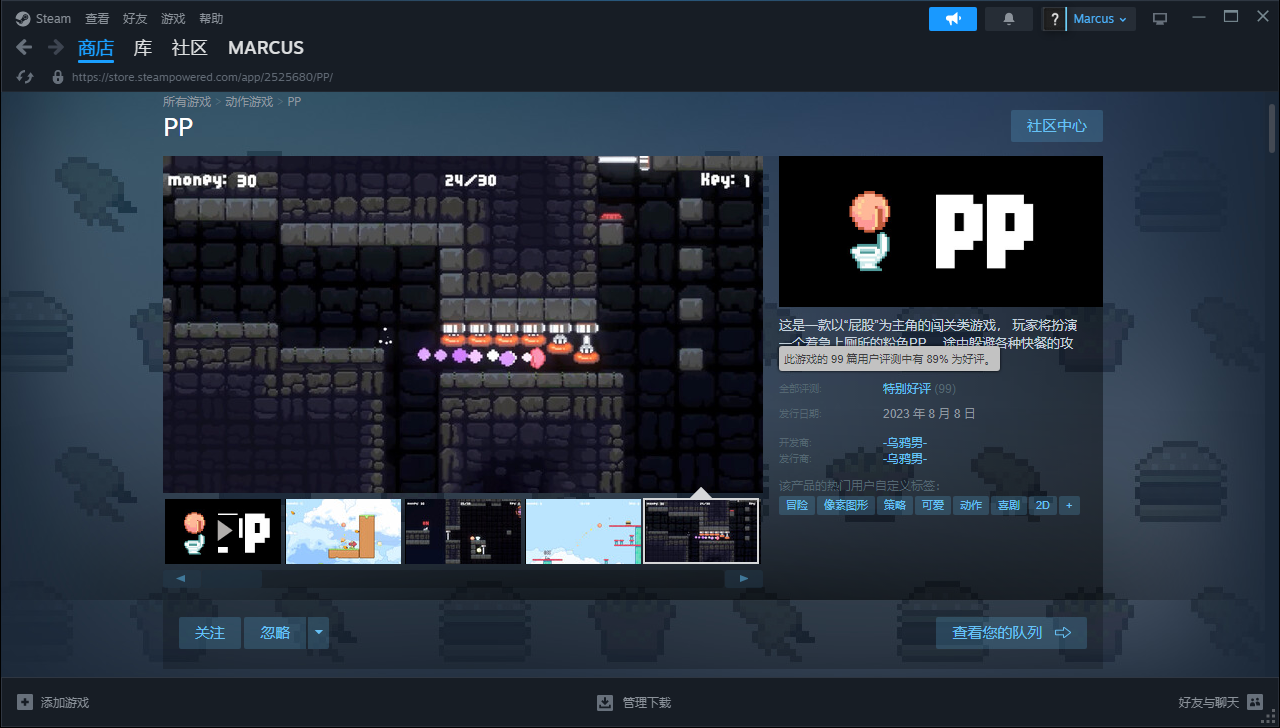
        <content type="html"><![CDATA[<link rel="preload" as="image" href="https://img01.anheyu.com/useruploads/8/2023/08/19/64e0c132cde50.png"/><link rel="preload" as="image" href="https://img01.anheyu.com/useruploads/8/2023/08/19/64e0c18c94a4b.png"/><link rel="preload" as="image" href="https://img01.anheyu.com/useruploads/8/2023/08/19/64e0c26fec403.png"/><link rel="preload" as="image" href="https://img01.anheyu.com/useruploads/8/2023/08/19/64e0c32766265.png"/><div><blockquote>该渲染可能存在排版问题，最佳体验请前往：<a href="https://blog.marcus233.top/posts/STEAM%E6%B8%B8%E6%88%8F%E3%80%8APP%E3%80%8B%E6%8E%A8%E8%8D%90">https://blog.marcus233.top/posts/STEAM%E6%B8%B8%E6%88%8F%E3%80%8APP%E3%80%8B%E6%8E%A8%E8%8D%90</a></blockquote><div><h2 id="">序言</h2><p>最近逛B站,发现了UP主<a href="https://space.bilibili.com/38899675?spm_id_from=333.337.search-card.all.click">-乌鸦男-</a>的一款好玩的游戏</p>
<p>然后上Steam一看</p><p>才<del>三块大洋</del>(涨成五块大洋了)</p><p><img alt="8月9日截图" src="https://img01.anheyu.com/useruploads/8/2023/08/19/64e0c132cde50.png"/></p><p>但还是挺便宜的</p><h2 id="steam">Steam介绍</h2><blockquote><p>“PP”着急上厕所，如厕之路困难重重，“快餐”是你的敌人，所有“快餐”都将使你喷射
找到厕纸和马桶才能进入下一关卡。复杂的地形可能需要一些技巧。</p><p><img alt="PP宣传图" src="https://img01.anheyu.com/useruploads/8/2023/08/19/64e0c18c94a4b.png"/></p><p>游戏中的图像、音乐、编程
均由B站UP主 -乌鸦男- 耗时一个月制作</p></blockquote>
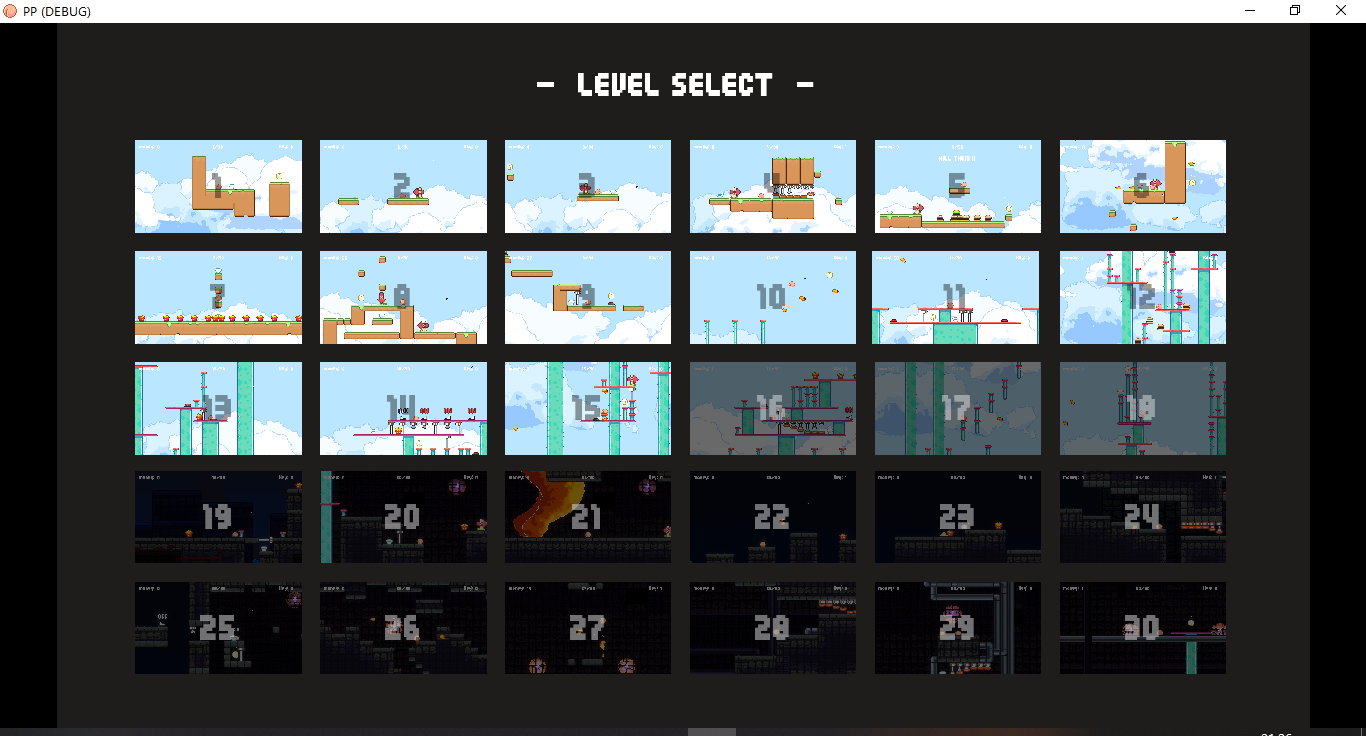
<p><img alt="Stean游戏截图" src="https://img01.anheyu.com/useruploads/8/2023/08/19/64e0c26fec403.png"/></p><h2 id="">实际游玩</h2><p>呜呜呜~,太难了,1.8小时才打了15关</p><p><img alt="关卡" src="https://img01.anheyu.com/useruploads/8/2023/08/19/64e0c32766265.png"/></p><p>但是整体还是挺好玩的,作为一款<del>休闲</del>游戏,真的令我血压增高(点名批评第七关,太难掌握时机了)</p><p>B站上也有通关教程(但你有了也通不了关)</p><h2 id="">评分</h2><p>整体评分: 3颗星</p></div><p style="text-align:right"><a href="https://blog.marcus233.top/posts/STEAM%E6%B8%B8%E6%88%8F%E3%80%8APP%E3%80%8B%E6%8E%A8%E8%8D%90#comments">看完了？说点什么呢</a></p></div>]]></content>
        <author>
            <name>Marcus</name>
            <email>marcus-zh@qq.com</email>
            <uri>https://blog.marcus233.top</uri>
        </author>
        <category scheme="https://blog.marcus233.top/categories/%E6%B8%B8%E6%88%8F%E6%8E%A8%E8%8D%90" term="游戏推荐"/>
        <published>2023-08-19T20:55:01.000Z</published>
        <rights>CC BY-NC-SA 4.0</rights>
    </entry>
    <entry>
        <title type="html"><![CDATA[博客一周年记]]></title>
        <id>博客一周年记</id>
        <link href="https://blog.marcus233.top/posts/%E5%8D%9A%E5%AE%A2%E4%B8%80%E5%91%A8%E5%B9%B4%E8%AE%B0"/>
        <updated>2023-08-09T00:00:00.000Z</updated>
        <summary type="html"><![CDATA[
好久没写文章了,因为没时间(

不知不觉就一年了,还是总结一下吧

]]></summary>
        <content type="html"><![CDATA[<div><blockquote>该渲染可能存在排版问题，最佳体验请前往：<a href="https://blog.marcus233.top/posts/%E5%8D%9A%E5%AE%A2%E4%B8%80%E5%91%A8%E5%B9%B4%E8%AE%B0">https://blog.marcus233.top/posts/%E5%8D%9A%E5%AE%A2%E4%B8%80%E5%91%A8%E5%B9%B4%E8%AE%B0</a></blockquote><div><p>好久没写文章了,因为没时间(</p><p>不知不觉就一年了,还是总结一下吧</p>
<h2 id="">总结</h2><p>我刚入坑,跟着<a href="blog.anheyu.com">鱼鱼</a>的B站视频开始建站,我算是鱼鱼最早的一批分数了</p><p>后面就加了糖果屋,就开始了愉快的魔改(</p><p>冰糖红茶真的是个奇妙的组合🤩</p><p>在疫情期间就开始跟着<a href="https://akilar.top/">店长</a>和鱼鱼的教程开始一步一步的学习(搞了个记事本来记录更新,却只坚持了几天)</p><pre class="language-txt lang-txt"><code class="language-txt lang-txt">9.12 更新hexo版本,根据https://blog.zhheo.com/p/790087d9.html更改cdn
9.13 跟店长https://akilar.top/posts/e87ad7f8/改了github徽标(差点坏了),评论区美化,友联美化,添加浮动效果,版权声明美化
9.14 github action,站点动态 title,打赏按钮投币彩蛋效果,侧边栏标签,归档,最近文章修改,加载渐变条,侧边栏个人卡片渐变色</code></pre><p>改了蛮多,也有很多大佬帮助了我</p><p>我学会了,也帮助了很多人</p><p>再后来,鱼鱼出了<a href="[hexo-butterfly-swiper-anzhiyu" title="- npm (npmjs.com">swiper插件</a>](<a href="https://www.npmjs.com/package/hexo-butterfly-swiper-anzhiyu)),但是好久不更新">https://www.npmjs.com/package/hexo-butterfly-swiper-anzhiyu)),但是好久不更新</a></p><p>我就摸索着写了<a href="https://www.npmjs.com/package/hexo-butterfly-swiper-marcus">hexo-butterfly-swiper-marcus</a>,算是第一个仿<a href="blog.zhheo.com">洪哥</a>的项目</p><p>然后写上头了,又在寒假写了个<a href="https://www.npmjs.com/package/hexo-butterfly-footer-marcus">hexo-butterfly-footer-marcus</a>仿的<a href="https://blog.leonus.cn/">leonus</a>和洪哥</p><p>就认识了<a href="https://xiaoran.host/">晚安</a>,然后和他一起超洪哥</p><p>2023.02.08 我和<a href="https://blog.fanwu.link/">GB</a>认识了,他也是个佬,于是乎,<a href="https://github.com/hexo-theme-Acrylic">Acrylic</a>诞生了</p><p>当初还是有很多佬来提了pr,谁水了我不说(</p><p>开始是GB在写,我不做评价(</p><p>clone一运行一堆错,有人说他,他一生气就闭源了(好不容易攒的100多个star,呜呜呜)</p><p>后来<a href="github.com/hexo-theme-Acrylic/hexo-theme-Acrylic">next版本</a>也出来了,现在是<code>rootlex</code>和<a href="blog.adil.com.cn">Adil</a>在维护</p><p>next一出来就吸引了很多人</p><p> 我们见没人用了,准备找佬帮我们优化优化</p><p>于是找到了鱼佬</p><p>鱼佬改不下去了,自己去开了个新主题(就是<a href="https://github.com/anzhiyu-c/hexo-theme-anzhiyu">AnZhiYU</a>)了</p><p>因为当时在上课,主题就搁置了好久好久</p><p>我重写了大部分</p><p>暑假就一直改改改,发了1.0.1正式版</p><p>但还是一堆错</p><p>没办法,一边有作业,一边有其他人的压力</p><p>鸽到了现在</p><p>现在我和GB已经初三了</p><p>没有时间更新了</p><p>主题就随缘了~</p><p>希望下一年考试顺利吧</p><hr/><p>8.18 Marcus</p></div><p style="text-align:right"><a href="https://blog.marcus233.top/posts/%E5%8D%9A%E5%AE%A2%E4%B8%80%E5%91%A8%E5%B9%B4%E8%AE%B0#comments">看完了？说点什么呢</a></p></div>]]></content>
        <author>
            <name>Marcus</name>
            <email>marcus-zh@qq.com</email>
            <uri>https://blog.marcus233.top</uri>
        </author>
        <category scheme="https://blog.marcus233.top/categories/%E6%88%91%E7%9A%84%E6%80%BB%E7%BB%93" term="我的总结"/>
        <published>2023-08-09T00:00:00.000Z</published>
        <rights>CC BY-NC-SA 4.0</rights>
    </entry>
    <entry>
        <title type="html"><![CDATA[2022年度总结]]></title>
        <id>2022年度总结</id>
        <link href="https://blog.marcus233.top/posts/2022%E5%B9%B4%E5%BA%A6%E6%80%BB%E7%BB%93"/>
        <updated>2022-12-31T23:59:59.000Z</updated>
        <summary type="html"><![CDATA[2022年度总结]]></summary>
        <content type="html"><![CDATA[<div><blockquote>该渲染可能存在排版问题，最佳体验请前往：<a href="https://blog.marcus233.top/posts/2022%E5%B9%B4%E5%BA%A6%E6%80%BB%E7%BB%93">https://blog.marcus233.top/posts/2022%E5%B9%B4%E5%BA%A6%E6%80%BB%E7%BB%93</a></blockquote><div><p>2022即将过去
让我来回忆过去的一年吧😘</p>
<h1 id="">关于学习</h1><ul><li><input readOnly="" type="checkbox" checked=""/> 升入初二</li><li><input readOnly="" type="checkbox" checked=""/> 认真学习</li><li><input readOnly="" type="checkbox"/> 内卷同学</li></ul><h1 id="">关于生活</h1><ul><li><input readOnly="" type="checkbox" checked=""/> 换个眼镜</li><li><input readOnly="" type="checkbox" checked=""/> 跑步满分</li><li><input readOnly="" type="checkbox"/> 等等</li></ul><h1 id="">关于技能</h1><ul><li><input readOnly="" type="checkbox" checked=""/> html</li><li><input readOnly="" type="checkbox" checked=""/> css</li><li><input readOnly="" type="checkbox" checked=""/> js</li><li><input readOnly="" type="checkbox" checked=""/> pug</li><li><input readOnly="" type="checkbox" checked=""/> yaml</li><li><input readOnly="" type="checkbox" checked=""/> react</li></ul><h1 id="">关于博客</h1><ul><li><p><input readOnly="" type="checkbox"/> 本地化插件</p></li><li><input readOnly="" type="checkbox"/> 主题文档理解</li><li><input readOnly="" type="checkbox" checked=""/> 自己魔改</li></ul><p>先写个大概吧</p></div><p style="text-align:right"><a href="https://blog.marcus233.top/posts/2022%E5%B9%B4%E5%BA%A6%E6%80%BB%E7%BB%93#comments">看完了？说点什么呢</a></p></div>]]></content>
        <author>
            <name>Marcus</name>
            <email>marcus-zh@qq.com</email>
            <uri>https://blog.marcus233.top</uri>
        </author>
        <category scheme="https://blog.marcus233.top/categories/%E6%88%91%E7%9A%84%E6%80%BB%E7%BB%93" term="我的总结"/>
        <published>2022-12-31T23:59:59.000Z</published>
        <rights>CC BY-NC-SA 4.0</rights>
    </entry>
    <entry>
        <title type="html"><![CDATA[Hello World]]></title>
        <id>Hello World</id>
        <link href="https://blog.marcus233.top/posts/Hello%20World"/>
        <updated>2022-08-09T18:00:00.000Z</updated>
        <summary type="html"><![CDATA[Welcome to Nextjs!]]></summary>
        <content type="html"><![CDATA[<div><blockquote>该渲染可能存在排版问题，最佳体验请前往：<a href="https://blog.marcus233.top/posts/Hello%20World">https://blog.marcus233.top/posts/Hello%20World</a></blockquote><p>Welcome to Nextjs!</p><p style="text-align:right"><a href="https://blog.marcus233.top/posts/Hello%20World#comments">看完了？说点什么呢</a></p></div>]]></content>
        <author>
            <name>Marcus</name>
            <email>marcus-zh@qq.com</email>
            <uri>https://blog.marcus233.top</uri>
        </author>
        <category scheme="https://blog.marcus233.top/categories/%E7%BD%91%E7%AB%99%E5%85%AC%E5%91%8A" term="网站公告"/>
        <published>2022-08-09T18:00:00.000Z</published>
        <rights>CC BY-NC-SA 4.0</rights>
    </entry>
    <entry>
        <title type="html"><![CDATA[Nextjs App router 博客试错记]]></title>
        <id>blog-next</id>
        <link href="https://blog.marcus233.top/posts/blog-next"/>
        <updated>1970-01-01T00:00:00.000Z</updated>
        <summary type="html"><![CDATA[## 1.MDX文件渲染
### 8.12
首先在vercel官网看到了[Markdown and MDX](https://nextjs.org/docs/app/building-your-application/configuring/mdx)
就先试了试[@next/mdx](https://www.npmjs.com/package/@next/mdx)
然后发现不支持动态导入
继续翻文档,发现了[next-mdx-remote](https://github.com/hashicorp/next-mdx-remote#react-server-components-rsc--nextjs-app-directory-support),简直和[App router](https://nextjs.org/docs/app)完美搭配
但是,但我后面想用remark和rehype插件时,发现没地方导出插件的生成结果
好嘛,读文档,他说我[可能不需要`next-mdx-remote`](https://github.com/hashicorp/next-mdx-remote?tab=readme-ov-file#you-might-not-need-next-mdx-remote)
来嘛,试试就试试,结果发现`import * as runtime from 'react/jsx-runtime'`的runtime和

```ts
const { default: MDXContent } = await run(code, {
    ...runtime,
    baseUrl: import.meta.url,
  })
```
的runtime不一样,所以,我...(不知道怎么办了)
我就开始翻[Discussions](https://github.com/hashicorp/next-mdx-remote/discussions/438),翻到这篇
哦!原来还有[next-mdx-remote-client](https://github.com/ipikuka/next-mdx-remote-client)可以用啊!
于是好写了(错误页面和toc还没写)

```tsx [filename=page.tsx] {1,2}
import { Suspense } from "react";
import { evaluate, type EvaluateOptions } from "next-mdx-remote-client/rsc";
import remarkFlexibleToc, { type TocItem } from "remark-flexible-toc";
import { useMDXComponents as Components } from "@/../mdx-components";
import { getPostBySlug } from "@/core/posts";
import Card from "@/components/Card";
import "@/styles/post.css";
export function generateMetadata({ params }: { params: { slug: string } }) {
  const { slug } = params;
  const { title, description } = getPostBySlug(decodeURIComponent(slug), [
    "title",
    "description",
  ]);
  return {
    title: `${title} - Marcus`,
    description: description,
  };
}
export default async function Post({ params }: { params: { slug: string } }) {
  const { slug } = params;
  const post = getPostBySlug(decodeURIComponent(slug), [
    "content",
    "cover",
  ]);
  const source = post.content;
  type Scope = {
    toc: TocItem[];
  };
  const options: EvaluateOptions<Scope> = {
    mdxOptions: {
      remarkPlugins: [remarkFlexibleToc],
    },
    vfileDataIntoScope: "toc",
  };
  const { content, scope, error } = await evaluate<Scope>({
    source,
    options,
  });
  console.log(scope.toc)
  return (
    <Card className="flex-wrap w-[40%]">
      <div className="cover w-full ">
        {/*<img src={post.cover} className="rounded-t-2xl" />*/}
      </div>
      <article className="p-5 flex flex-col gap-4 max-w-full">
      <Suspense>
      {content}
    </Suspense>
      </article>
    </Card>
  );
}
```
``` bash
$ hexo new "My New Post"
```

嗯,这下可以了
### 8.26
嗯嗯嗯...
这玩意好像不支持rehype插件😓
一装上就渲染不出来
好嘛,想用[mdx-bundler](https://www.npmjs.com/package/mdx-bundler),却懒得改`async`了
又用回了`next-mdx-remote`

> [!tip]
> Highlights information that users should take into account, even when skimming.

111

> [!note]
> Highlights information that users should take into account, even when skimming.

111

> [!warning]
> Highlights information that users should take into account, even when skimming.

111

> [!error]
> Highlights information that users should take into account, even when skimming.]]></summary>
        <content type="html"><![CDATA[<p>当前内容无法在 RSS 阅读器中正确渲染，请前往：<a href="https://blog.marcus233.top/posts/blog-next">https://blog.marcus233.top/posts/blog-next</a></p>]]></content>
        <author>
            <name>Marcus</name>
            <email>marcus-zh@qq.com</email>
            <uri>https://blog.marcus233.top</uri>
        </author>
        <published>1970-01-01T00:00:00.000Z</published>
        <rights>CC BY-NC-SA 4.0</rights>
    </entry>
    <entry>
        <title type="html"><![CDATA[Markdown渲染]]></title>
        <id>markdown</id>
        <link href="https://blog.marcus233.top/posts/markdown"/>
        <updated>1970-01-01T00:00:00.000Z</updated>
        <summary type="html"><![CDATA[## Markdown渲染
<!-- # 一级标题(不用) -->
## 标题

### 三级标题

#### 四级标题

##### ~~五级标题~~(一般不用)

###### ~~六级标题~~(一般不用)

## 行内样式

**加粗**

*斜体*

`行内代码`

~~删除线~~

## 链接

[Redish101](https://redish101.top)

https://redish101.top

<https://redish101.top>

GH@Redish101

## 图片

![logo](/avatar.png)

## 列表

### 有序列表

1. 第一行
2. 第二行
3. 第三行
   1. 第四行
   2. 第五行
4. 最后行

### 无序列表

- 第一行
- 第二行
- 第三行
  - 第四行
  - 第五行
- 最后行

## 引用

[Redish101](https://redish101.top)曾经说过

> 笨蛋马库斯

## 代码块

```tsx [filename=page.tsx] {1,2}
import { Suspense } from "react";
import { evaluate, type EvaluateOptions } from "next-mdx-remote-client/rsc";
import remarkFlexibleToc, { type TocItem } from "remark-flexible-toc";
import { useMDXComponents as Components } from "@/../mdx-components";
import { getPostBySlug } from "@/core/posts";
import Card from "@/components/Card";
import "@/styles/post.css";
export function generateMetadata({ params }: { params: { slug: string } }) {
  const { slug } = params;
  const { title, description } = getPostBySlug(decodeURIComponent(slug), [
    "title",
    "description",
  ]);
  return {
    title: `${title} - Marcus`,
    description: description,
  };
}
export default async function Post({ params }: { params: { slug: string } }) {
  const { slug } = params;
  const post = getPostBySlug(decodeURIComponent(slug), [
    "content",
    "cover",
  ]);
  const source = post.content;
  type Scope = {
    toc: TocItem[];
  };
  const options: EvaluateOptions<Scope> = {
    mdxOptions: {
      remarkPlugins: [remarkFlexibleToc],
    },
    vfileDataIntoScope: "toc",
  };
  const { content, scope, error } = await evaluate<Scope>({
    source,
    options,
  });
  console.log(scope.toc)
  return (
    <Card className="flex-wrap w-[40%]">
      <div className="cover w-full ">
        {/*<img src={post.cover} className="rounded-t-2xl" />*/}
      </div>
      <article className="p-5 flex flex-col gap-4 max-w-full">
      <Suspense>
      {content}
    </Suspense>
      </article>
    </Card>
  );
}
```

## 分割线

---

***

___

## 扩展语法

> [!tip]
> 小贴士

中间要有内容

> [!note]
> 便签

中间要有内容

> [!warning]
> 最好不要这样做

中间要有内容

> [!error]
> 哒咩哒咩!!]]></summary>
        <content type="html"><![CDATA[<p>当前内容无法在 RSS 阅读器中正确渲染，请前往：<a href="https://blog.marcus233.top/posts/markdown">https://blog.marcus233.top/posts/markdown</a></p>]]></content>
        <author>
            <name>Marcus</name>
            <email>marcus-zh@qq.com</email>
            <uri>https://blog.marcus233.top</uri>
        </author>
        <published>1970-01-01T00:00:00.000Z</published>
        <rights>CC BY-NC-SA 4.0</rights>
    </entry>
</feed>